Intelligent Curation Tagging for Creative Workflows
Github link: fineshyt
Problem and Motivation
I have thousands of photos. Like approximately 14,000 RAW, TIFF, RAF, JPG, and JPEG files. Setting aside the time, cost, and workflows I do not know of using tools such as lightroom or Pixea, Its also hard to find which photos are meet my imaginary threshold for being an artful memory. Which am I emotionally attached to because I spent 45 minutes on my knees in the dirt? Which has that grain that makes me goo ohhh? Wait one sec, peep my shi.

This problem presented a good excuse to excuse to hop back into using machine learning tools as software. The last time I did anything in this space was deploying a transformer model in 2021. In AI years that's basically as old as your mom... The original idea sounded plausible: describe my aesthetic to a local vision model, point the app at a folder, and let it tell me which images matched my taste. Feed in a prose description, scan the archive, get back the fine shyt if you will 😉. But once I started building around that premise, it became obvious that a style classifier couldn't classify images outside of the prompt it began with. I wanted a way to make judgment possible again inside a giant, messy archive
System Overview
The first version asked a vision LLM whether a photo matched your style based on a prose description of your taste.
That approach was useful, but it exposed a few weaknesses:
-
Visual taste is hard to encode in text. The model's understanding of the aesthetic I prompted for and the one it believed matched my aesthetic drifted far from one another.
-
It was expensive! The amount of compute LLaVa takes to run the classification task could spike total RAM usage to 15 gigs. It's literally easier to run bg3
The larger problem was architectural. My ratings were not actually shaping the system. There was kinda no point to rating the images if they didn't affect what was being considered a match. The system was primed for being AI driven but the AI elements were being used poorly. To make use of a better architecture, the LLaVa model now handles descriptive metadata only, while taste is learned from your own rating history via CLIP embeddings and a preference model. This better matched the core idea in the project's "vibe / affinity" direction. The system could now learn what fine shyt was based on my behavior instead of a one-time prompt.
You still point the app at a folder of images and let it ingest a sample from your archive. The system computes quality signals(sharpness, exposure), converts files, extracts metadata with LLaVa, generates CLIP embeddings, and streams the results into a live gallery. From there you can review and rate the images you load in. The machine helps with description and triage. It will prioritize reviewing images that are are probably my vibe. The aesthetic direction is something you tune by reviewing the images you ingest. Descriptive judgment, technical judgment, and personal preference are treated as different problems instead of being collapsed into one model verdict.
Brief Architecture Overview
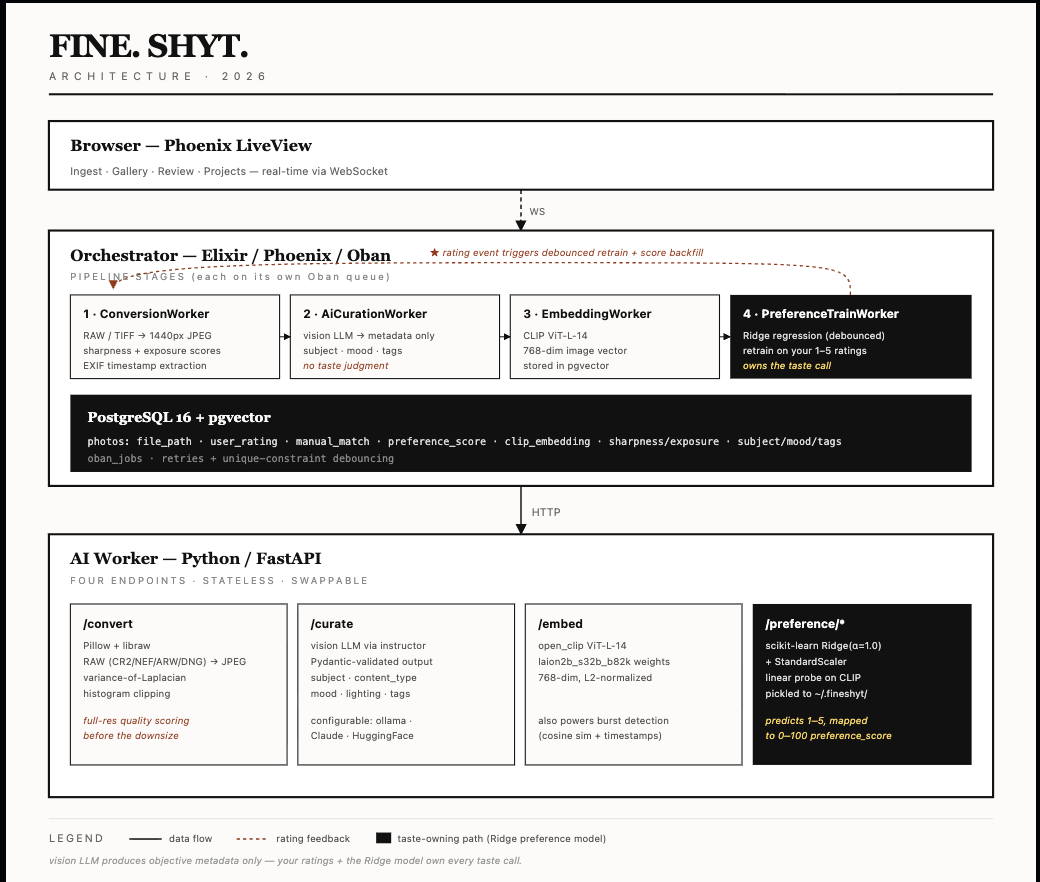
The system is split into an orchestrator and an AI worker. The orchestrator owns the UI, queueing, persistence, and real-time updates. The AI worker handles image processing, metadata extraction, embeddings, and preference-related computation.The pipeline is staged so each step can fail, retry, and scale independently.
Ingestion and the Curation Pipeline
Photos enter the system through a local scan. RAW/TIFF is decoded via libraw/Pillow, downsized to a 1440px JPEG (what the gallery and LLM both consume). Before downsizing, sharpness (variance-of-Laplacian) and exposure (histogram clipping) are measured on the full-res pixels. These become sharpness_score and exposure_score which are pure image-statistics signals, no model involved. AN EXIF timestamp is pulled out to fill captured_at (used later by burst detection). This outputs a row in photos with the JPEG path and technical quality score. The ingestion layer also has to be careful about not reprocessing the same image over and over, which is why idempotency is part of the design from the start: shortcode uniqueness, already_processed?, and existing stem checks all exist to keep the archive from turning into a duplicate factory.
From there, the work is split into a staged pipeline rather than one giant "analyze photo" task. That decomposition is both a product decision and an engineering one. It keeps each step understandable, makes failures easier to isolate, and lets the system retry one part of the process without discarding everything else that already succeeded
A typical photo moves through a sequence like this:
-
ConversionWorker
Opens the original file, whether that is RAW, TIFF, or some more ordinary image format.
Computes technical quality signals and extract file-level metadata before later stages abstract the image down into a model-friendly format.
Produces a workable JPEG for downstream use.
Saves the new file to orchestrator/priv/static/uploads
-
AiCurationWorker
Sends the converted image to the vision model.
Its job is descriptive metadata only: what is in the image, what kind of mood it suggests, how the lighting reads, and what tags might help later organization.
It is no longer responsible for deciding whether a photo matches your taste. That boundary matters.
-
Embedding / preference-related work
Once the photo exists in a stable converted form, the system can compute an embedding and use rating history to support personalized preference scoring.
This is where the taste-learning loop starts to take shape, because the archive is no longer being judged only by a generic model response. It is being judged by a model that learns from your ratings over time, so the more you use it, the better it gets at surfacing the photos you like.
The end result is a pipeline that behaves more like a production workflow than a one-shot script. A failure in metadata extraction should not force reconversion. A bottleneck in model inference should not block the archive from making forward progress elsewhere. And once the jobs start landing, results can stream into the gallery while processing is still ongoing, making the system feel less like "wait for batch job to finish" and more like an active curation workspace
The numbers help make that real. In one case, the system surfaced 17 photos out of 489 that actually fit into a project. In a larger run, out of around 3,600 processed photos, 214 emerged as matches worth reasoning about for future projects. At this pace, I can should be able to make it through about 2000 photos a session. Possibly the entire backlog 14,000 in a week.
The AI worker: Metadata, Embeddings, and Preference Training
The ML pipelines first job is to retrieve structured visual metadata. Given an image, it should return useful, consistent fields such as subject, artistic mood, lighting critique, content type, and suggested tags. This is a better fit for the strengths of a vision model: describing what it sees and producing metadata that helps later filtering, browsing, and organization
The JPEG goes to the locally hosted LLaVa model via Ollama(swappable to Claude or huggingface). Local inference is appealing because it is private and effectively free after setup, though it turns image analysis into a very literal hardware problem. RAM is now the only bottleneck and "cheap" becomes a question of patience and thermals. The worker uses instructor to force the response into a Pydantic schema. Crucially, the prompt asks only for descriptive fields; what's in the photo, what the light looks like, what it could be tagged as. It is not asked "do I like this" or "does this match my style." That job belongs to the preference model. If you swap LLaVA for Claude, the text of these fields gets sharper, but the taste verdict doesn't change because the taste model doesn't read them.
VALID_CONTENT_TYPES = {
    "portrait", "street", "family", "landscape",
    "still_life", "architecture", "abstract", "other"
}

def coerce_content_type(v: Any) -> str:
    """Forces invalid LLM outputs into the 'other' category."""
    if isinstance(v, str):
        v_lower = v.lower().strip()
        if v_lower in VALID_CONTENT_TYPES:
            return v_lower
    # If the LLM hallucinates 'artwork' or anything else, default to 'other'
    return "other"

# Create a custom type using the validator
SafeContentType = Annotated[str, BeforeValidator(coerce_content_type)]

class PhotoMetadata(BaseModel):
    subject: str = Field(description="The primary subject of the photo. Be specific — describe what is actually depicted.")
    content_type: SafeContentType = Field(
        description=(
            "The primary content category. Choose exactly one: "
            "'portrait' = single person, headshot, or environmental portrait; "
            "'street' = candid urban/public life, people in city environments; "
            "'family' = groups of people, gatherings, events, snapshots; "
            "'landscape' = outdoor scenery, nature, no dominant human subjects; "
            "'still_life' = objects, food, close-up of non-living things; "
            "'architecture' = buildings, interiors, urban structures; "
            "'abstract' = non-representational, heavy manipulation, or texture-focused; "
            "'other' = anything that doesn't fit the above."
        )
    )
    lighting_critique: str = Field(
        description="A brief, one-sentence critique of the lighting and contrast."
    )
    artistic_mood: str = Field(description="The emotional tone of the photo.")
    suggested_tags: list[str] = Field(description="5 to 7 specific tags describing technique, mood, or subject for a portfolio database. Do not include generic terms like 'photography' or 'photo'.")
In a separate model pipeline, CLIP turns each photo into a vector. CLIP (ViT-L-14, a vision transformer trained on 2B image-text pairs) runs each photo through its image encoder and spits out a 768-dim L2-normalized embedding, a point in a semantic space where visually/conceptually similar photos land near each other. This is the feature extractor. CLIP was trained contrastively on 2B image-text pairs, so the geometry of this space already encodes "looks similar," "same subject," "same mood", all things that correlate with what you'd rate highly. Nothing about fine shyt yet. Not our fine shyt at least. That distinction also keeps the architecture honest. The worker can be pointed at different model providers through environment configuration — local inference through Ollama, hosted APIs, or other compatible endpoints — but the model choice changes the source of descriptive intelligence, not the source of authority. Local inference is appealing because it is private and effectively free after setup, though it turns image analysis into a very literal hardware problem: the fans spin, the queue grows, and "cheap" becomes a question of patience and thermals. Hosted models are easier to scale, but the core design stays the same either way: the model annotates; I decide.
When the embedding lands, the worker checks photo.user_rating:
Unrated → enqueue PreferenceScoreWorker. Just compute its score against the existing model. No retrain. This is the hot path during batch import of hundreds of new photos.
Already rated → enqueue PreferenceTrainWorker. This photo is a new (embedding, rating) pair; the model should actually relearn.
Every star press writes user_rating (1–5) and enqueues PreferenceTrainWorker with trigger: rating_change. When retraining our ridge regression model we need to gather our photos. Photos.list_rated_with_embeddings/0 returns [{id, clip_embedding, user_rating}] for every "complete" photo with both, and will bail if there are fewer than 20 data points. Ridge regression is the taste model: a linear on top of CLIP features with L2 regularization (alpha=1.0) so a small label set doesn't overfit. It outputs a 768-dim weight vector w and a scalar b such that rating ≈ w·x + b. Geometrically, w points in the direction of "things you rate highly" through CLIP space. That rating becomes the integer preference_score. The gallery's MATCH badge fires when preference_score >= Photos.match_threshold() (currently 70, deliberately tuned to sit just under the median score of any 5 star photos).
The operational ugliness of this workflow has to stay visible. _status_for and _error_detail on the Python side unwrap openai.APIError so upstream codes, 404 model-not-found, 413 payload-too-large, 429 rate-limited, survive the hop to Elixir as structured payloads. AiCurationWorker.format_api_error/1 parses them back into human sentences, photos land in a curation_status: "failed" lane with a populated failure_reason, and every worker hands the failure plus its Oban attempt/max_attempts counters to ErrorLog.record/1, itself wrapped in rescue so the audit trail can't be taken down by the thing it's auditing. Inserts broadcast on PubSub to a real-time /logs feed. AI pipelines fail in extremely specific and uninteresting ways (the LLM returns a string where a float should be, rawpy segfaults on one RAW in a thousand, Ollama 429s under burst, a worker vanishes mid-inference). Most of the work here is figuring out why outputs are malformed, why a worker is wedged, or why jobs disappeared into the void, which required an error log rather quickly.
The Two Pass Loupe View
The most important design in the project was that this enabled curation. This sounds rather silly but my original idea would have collapsed the entire process into a verdict based keep or reject workflow based on the LLM of choice. That is efficient in theory, but it skips over the act of looking at my photos. In practice, the whole point of the system is that the machine helps me get through the archive, while I remain the person deciding what matters. That is why the review experience ended up centered on a two-pass loupe workflow rather than a single screen
The first pass is for culling. In that mode, I am moving quickly through unrated images. The culling process prioritize the photos with the lowest vibe match first. In that workflow I am trying to answer whether a photo deserves to stay in the archive at all. Photos are soft deleted in this stage. Rejected does not mean deleted. A rejected photo still needs to exist as a record so the system knows it has already been seen and should not come back through the same culling pass. Hard delete is a separate, explicit action. I am able to protect the archive, preserve review history, and keeps the app aligned with the fact that creative judgment changes over time. This also guarantees I can free up disk space while going through the 14K or so images I have. Perfect for me bc my computer can barely fit Bulder's Gate 3. The second pass is for rating. That mode is slower and more comparative. Once an image has survived the initial cut, I want to judge it against nearby maybes, not against obvious rejects. That is where the archive starts to feel less like a pile of files and more like a body of work. A collection of fine shyt if I may 😃.
The keyboard-first interaction matters here. Good review flow depends on minimizing friction between seeing and deciding. The interface should support that rhythm rather than interrupt it with too many clicks, modal confirmations, or clever UI tricks. Rejection can auto-advance because the decision is definitive enough to keep momentum. Ratings are different: when I assign one, I usually still want the image to remain in place for another second so I can think about why I like it. That tiny UX distinction matters because it reflects the actual psychology of editing. I need to sit with a photo, consider it's origin, and wonder about where it may fit. I've found myself with a family photo album of round 40 photos. In other words, the loupe view is where the whole project stops being an AI pipeline for images and becomes a tool for editing photographs. The model can describe, score, and suggest and the interface has to make judgment feel natural.
The Output
Plenty of images are competent, interesting, or emotionally charged without belonging anywhere. With the current approach I achieved both a cleaner archive and a way to surface images that belong together. Family photos, the beginning of a series, a blog post, a potential photo submission. I can group them and have them in my system and that be fine, but the project export layer gives the whole review process a destination that adds to my overall creative output.
Once enough photos have been rated and grouped, the app can export approved images for downstream use. In practice, that means the archive can feed a blog or publishing workflow instead of ending at the interface. Unrated photos do not go out. An image only exports if I have actually judged it, and if it meets one of the approval paths: a strong rating, a manual pick, or a sufficiently high preference score. That rule keeps the system aligned with the whole philosophy of the project. Machine assistance is allowed, but publication still requires a human opinion.
The export step also writes out structured metadata alongside the images, including things like tags, mood, preference score, rating, and project name. That matters because the point is not only to move files around; it is to preserve the reasoning context that made those files meaningful. Once that data exists outside the app, the curation work can continue somewhere else. It could now be simple to make a tool that ingest these photos and creates my own storefront for photo prints. Or they could just go in my photography portfolio. Seen this way, projects are what rescue the whole system from being an especially elaborate sorting exercise. The archive is being shaped toward making things.
What I learned
Lesson 1: LLMs have no taste. Demote them to data-entry clerks.
At first, it was tempting to ask the model for the thing I actually wanted. It would tell me whether this photo feels like me. That shortcut turned out to be less useful than it sounded and was legit giving me anything with blur or a lot of grain back. The model could describe an image, sometimes eloquently, but descriptive fluency is not the same thing as aesthetic trust. Once I separated metadata from judgment, the whole system got clearer. The model became more reliable because it was being asked to do less, and the product became more honest because it stopped pretending otherwise. I am less of a hack for that lesson
Lesson 2: AI pipelines in personal software are just glorified plumbing. If you don't build idempotency and error queues (Oban), your archive turns into a duplicate factory.
Breaking ingestion into stages like conversion, metadata extraction, inference, embeddings, backfills, sift deletes, and export was more work up front, but it made the system behave like a workflow instead of a demo. Failures became visible. Retries became possible. Adding new features to old photos became a matter of backfill tasks instead of full reprocessing. Managing computer resources became effective. It's is the kind of operational complexity that sounds unnecessary in a write-up but actually determines whether a tool survives contact with a real archive.
Lesson 3: The hardest part wasn't the math (I trusted Claude with that). The hard part was building a system that respects that my taste might change in 6 months.
Local-first image workflows are only simple in concept. Even the pleasant-sounding version of the setup, "point at a directory and import", hides a lot of necessary mechanics underneath. In reality, building this meant dealing with format weirdness, RAW support headaches (shelling out to Python to decode RAWs because native Elixir libraries don't exist yet feels like dark magic), filesystem coordination, EXIF gotchas, and synchronizing state between the Elixir orchestrator and the Python AI worker without losing data.
The hardest product questions were often the least glamorous ones. Not "which vision model should I use", unfortunately, but "should a rejected photo auto-delete?", "what actually counts as deleted?", and "how do I keep old work from resurfacing in annoying ways?" Those decisions ended up defining the experience more than any specific machine learning model did. Personal software inherits all the messiness of personal data, and a system like this has to be flexible enough to handle the fact that what I consider fine shyt today might not be what I consider fine shyt next year.
Conclusion
Alright lets wrap this up. To sum it up this project taught me to demote the LLM, respect the operational plumbing, and treat photo curation as an interface problem just as much as an AI problem. The machine can do the heavy lifting, compute the embeddings, and guess the vibe, but the publication still requires a human opinion. Turns out fitting models is still the fun part. I should avoid leaning on the fancier generation magic of LLM's in software architecture.
Now if you'll excuse me, I have cleared enough photos in the archive to safely download Baldur's Gate. I won't resist the durge this time.
Github link: fineshyt